
In this post, I will explain how to create a simple CRUD Application in Laravel 5.6. Create, Read, Update and Delete (CRUD) is a very simple functionality of most of the applications. I will create a simple blog system where we can create a new post, view all posts and read a single post, update and delete the post. I will be using GIT Bash for CLI and Sublime Text 3 as a code editor. Also, I will be doing this in Laravel 5.6. Here are the requirements for installing Laravel 5.6 in your machine:
- PHP >= 7.1.3
- OpenSSL PHP Extension
- PDO PHP Extension
- Mbstring PHP Extension
- Tokenizer PHP Extension
- XML PHP Extension
- Ctype PHP Extension
- JSON PHP Extension
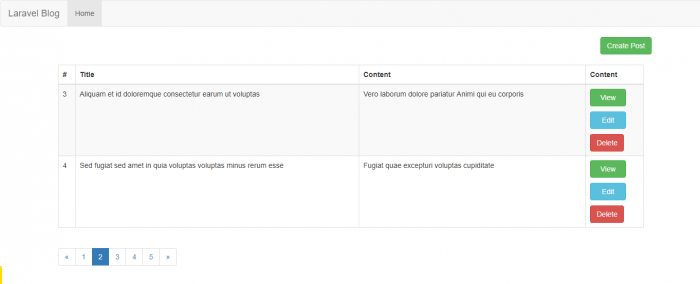
What we will be building
Create Laravel Application
So, let’s get started. To create Laravel project, simply type the following command on your command line in your project directory.
composer create-project laravel/laravel=5.6 blog
Database Configuration
This will create a fresh laravel 5.6 project. After creating laravel project, you need to setup database for your application. Create a new database. In my case, I named it laravelblog but you can name it anything. My username is root and password is secret. So, to configure database, open .env file which is in application root directory and configure as required. My configuration looks like below:
DB_CONNECTION=mysql

DB_HOST=127.0.0.1

DB_PORT=3306

DB_DATABASE=laravelblog

DB_USERNAME=root

DB_PASSWORD=secret
Creating Table and Migration
Now, let’s create migration. Run the following command.
php artisan make:migration create_posts_table –create=posts
This will create a migration file under database/migrations directory named as 2018_03_22_033034_create_posts_table.php. Open up the newly created migration file, and edit up() function to create columns of table. So, you complete migration file looks like below:
increments('id');

            $table->string('title');
            $table->text('body');

            $table->timestamps();
        });
    }

    /**
     * Reverse the migrations.
     *
     * @return void
     */
    public function down()
    {
        Schema::dropIfExists('posts');
    }
}
After changing your migration file, you need to run the migration to create table. Run the following command to migrate:
php artisan migrate
This command will create table as below screenshot

Create Model for table
We have our table now, we need model to connect easily with our database. Laravel provide no any directory for Model but I usually prefer to create a separate directory call to store all the models in application. Create a directory called Models in directory App/Models. To create model, run the following command:
php artisan make:model Post
Now, open up your file under App/Models/Post.php. You can set your setting for table and timestamp and also other details inside this file
@stopCreating Routes for application
We can create CRUD routes with single route resource in laravel. Great! Lets create a resource route for post. Open up your
web.phpfile under routes directory and add the following code.Route::resource(posts,'PostController');Create Controller
Create new controller for Post Model. To create it, simply run the following command.
php artisan make:controller PostController –resourceThis will create a new controller file under
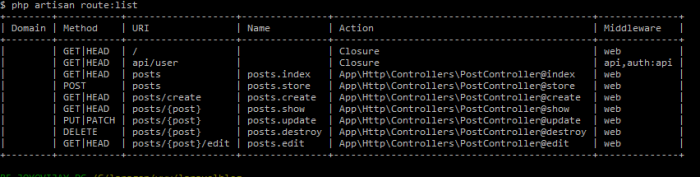
App/Http/Controllersdirectory. After this, you can check if your routing is correct by typing the following command:php artisan route:listIt will list all your routes as below:
Modify PostController
Now, it’s time to write some code in controller. Open your
PostController.phpfile. It consist of all the methods i.e.index(),create(),store(),show(),edit(),update()anddestroy()to make a crud application. We will make some make each method works final controller looks like below:$posts]); } /** * Show the form for creating a new resource. * * @return \Illuminate\Http\Response */ public function create() { return view('posts.create'); } /** * Store a newly created resource in storage. * * @param \Illuminate\Http\Request $request * @return \Illuminate\Http\Response */ public function store(Request $request) { //validate input fields request()->validate([ 'title' => 'required', 'body' => 'required', ]); //save data into database Post::create($request->all()); //redirect to post index page return redirect()->route('posts.index') ->with('success','Post add successfully.'); } /** * Display the specified resource. * * @param int $id * @return \Illuminate\Http\Response */ public function show($id) { $post = Post::find($id); return view('posts.show', ['post' => $post]); } /** * Show the form for editing the specified resource. * * @param int $id * @return \Illuminate\Http\Response */ public function edit($id) { $post = Post::find($id); return view('posts.edit', ['post' => $post]); } /** * Update the specified resource in storage. * * @param \Illuminate\Http\Request $request * @param int $id * @return \Illuminate\Http\Response */ public function update(Request $request, $id) { //validate input fields request()->validate([ 'title' => 'required', 'body' => 'required', ]); //save data into database Post::create($request->all()); //redirect to post index page return redirect()->route('posts.index') ->with('success','Post updated successfully.'); } /** * Remove the specified resource from storage. * * @param int $id * @return \Illuminate\Http\Response */ public function destroy($id) { Post::destroy($id); return redirect()->route('posts.index') ->with('success','Post deleted successfully'); } }Create View Files
In this step, I will create some view files along with layout. I store the
default.blade.phpfile inResources/Views/layoutsdirectory and other post view files inResources/Views/Postsdirectory. I created a master template which every view file extends.
resources/views/layouts/default.blade.phpLaravel Blog @yield('content')I have also created other blade files for post view in
Resources/Views/Postsdirectory.
resources/views/posts/index.blade.phpFile for displaying all blog posts@extends('layouts.default') @section('content')
@if (Session::get('success'))@endif @stop{{ Session::get('success') }}
resources/views/posts/create.blade.phpFile for creating new blog post@extends('layouts.default') @section('content')Create new post!
@if ($errors->any())@endif@foreach ($errors->all() as $error)
- {{ $error }}
@endforeach
resources/views/posts/show.blade.php file for viewing each blog post
@extends('layouts.default')
@section('content')
Show Post
Title:
{{ $post->title }}
Body:
{{ $post->body }}
@stop
resources/views/posts/edit.blade.php to edit blog post
Edit Post!
@if ($errors->any())
@foreach ($errors->all() as $error)
- {{ $error }}
@endforeach
@endif
@stop
We are almost complete. Let’s test our application
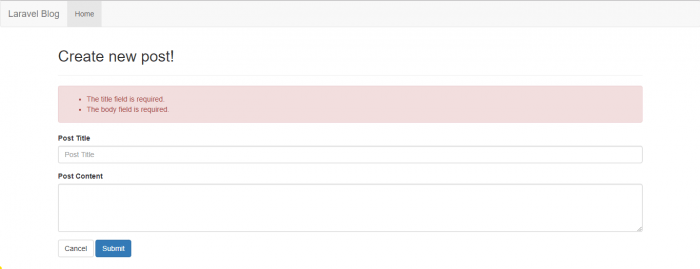
Create View Screenshot
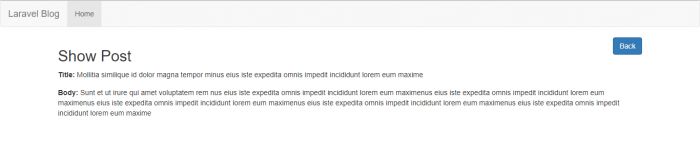
Show View Screenshot
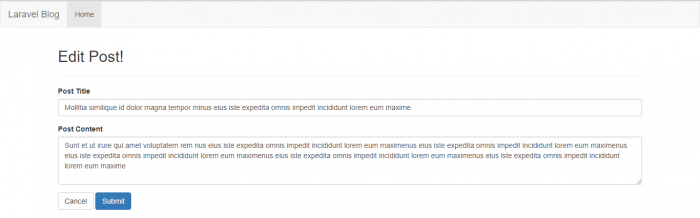
Edit View Screenshot
Happy Coding!